
Silk Mobile
Table of Contents (Homepage)
- Overview
- Setting Up
- Getting Started
- How To
- Connecting Devices And Emulators
- Preparing Applications For Testing
- Managing Applications
- Recording Tests
- Working With Test Commands
- Adding Commands To Your Scripts
- Object Commands
- Click
- ClickCoordinate
- ClickIn
- ClickOffset
- Drag
- ElementGetProperty
- ElementGetTableRowsCount
- ElementListPick
- ElementListSelect
- ElementListVisible
- ElementScrollToTableRow
- ElementSendText
- ElementSetProperty
- ElementSwipe
- ElementSwipeWhileNotFound
- GetAllValues
- GetElementCount
- GetElementCountIn
- GetTextIn
- IsElementBlank
- IsElementFound
- IsFoundIn
- LongClick
- RunNativeAPICall
- SendWhileNotFound
- VerifyElementFound
- VerifyElementNotFound
- VerifyIn
- WaitForElement
- WaitForElementToVanish
- GetCoordinateColor
- DragDrop
- Application Commands
- Device Commands
- Web (Hybrid) Specific Commands
- Utilities Commands
- Monitoring Commands
- Configuration Commands
- ExtractLanguageFiles
- SetDefaultClickDownTime
- SetDefaultTimeOut
- SetDefaultWebView
- SetDragStartDelay
- SetInKeyDelay
- SetKeyToKeyDelay
- SetLanguage
- SetLanguagePropertiesFile
- SetShowImageInReport
- SetShowPassImageInReport
- SetShowReport
- SetSpeed
- SetThrowExceptionOnFail
- SetWebAutoScroll
- StartStepsGroup
- StopStepsGroup
- TextFilter
- Miscellaneous Commands
- Controlling Element Identification Rules
- Editing Test Objects
- Executing Test Scripts
- Report Of Executed Test
- Working From Code Environment
- Continuous Integration
- Layout Verification Tests
- Use Device Vitals Monitors
- Troubleshooting
- Terminology
Using Language Properties Files
You can use a language properties file to test your application on a different language. In this way, the same test script originally prepared to test an application in one language can be utilized to test it in any number of other languages.
This is done by using the SetLanguagePropertiesFile which specify which properties file to use.
Extracting Language Properties Files
You can either create the properties file manually or generate it automatically.
To extract all of the language properties files packaged with an application automatically:
Step 1: Preparing Applications For Testing.
Step 2: Right-click the name of the application from which you want to extract the language files.
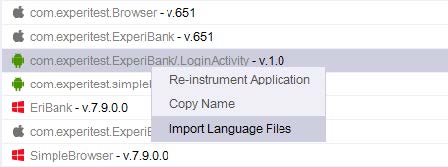
Step 3: Select the Import Language Files option
Step 4: In the dialog box now displayed, navigate to the location to which the files are to be extracted.
Step 5: Click OK.
Language Properties File Structure
A languages properties file is a text properties file (ends with the suffix .properties) which maps a key and the identifier of the element. On you script you will use the key to identify the element. You can use the same key for all languages file and this way the same script will run for any language.
For example, the following lines represent a portion of the English language properties file for a certain banking application:
automatic_alerts_text=General Alerts
delete_pay_to=Delete Pay To
show_hidden_deals=Show hidden deals
accounts_heloc_footnote=1This payment amount may reflect the minimum amount due from your last statement period. View your statement for more details.
mrd_check_photo_status=Received
p2p_added_recipient_message=The recipient has been added, and you can now request a transfer.
A Spanish language version of this same application might begin something like what appears below:
automatic_alerts_text=Alertas Generales
delete_pay_to=Eliminar la Paga a
In order to operate on the first element appears on the file, we will create a command on the script with the identifier as key - delete_pay_to
In order to run the application on each language we need to make sure to change the SetLanguagePropertiesFile accordingly.
Supported properties
Following are the properties that you can use in the text properties file:
-
text
-
partial_text
-
placeholder
-
accessibilitylabel
-
accessibilityidentifier
-
accessibilityvalue
-
name
-
xpath